
Ethernet to UART Converter for Raspberry Pi Pico, 10/100M Ethernet, UART TTL 3.3V / 5V Compatible, TCP/UDP Operating Modes, Supports 2-CH Ethernet to UART Data Transparent Transmission

Development Resources
https://www.waveshare.com/wiki/Pico-ETH-CH9121?Amazon

Overview
Ethernet To UART Converter For Raspberry Pi Pico, 10/100M Ethernet, Enabling Network Communication Through UART

Features
Standard Raspberry Pi Pico header, supports Raspberry Pi Pico series
Onboard Ethernet to UART transparent transceiver, 2-CH UART, standalone transparent transmission for each channel
Onboard jumpers for pin configurations
Embedded Ethernet MAC and PHY layers
Bi-direction transparent data transmission between UART and Ethernet
10/100M, full-duplex/half-duplex auto-negotiation Ethernet interface, 802.3-compliant
Auto-MDI/MDIX, detect and switch cable type automatically
Supports DHCP auto-obtained IP and DNS domain access
Network parameter configuration like chip operating mode, port, IP, via host computer software or UART command
Four operating modes: TCP CLIENT, TCP SERVER, UDP CLIENT, UDP SERVER
Full-duplex or half-duplex UART communication supports RS485 RX/TX auto switch (external RS485 controller required)
Supports virtual serial port software (provided)
KEEPALIVE mechanism support

Specifications
Operating votlage:3.3V/5V
Operating mode: TCP/UDP
UART TTL: 3.3V / 5V compatible
Operating temperature: ~40°C ~ 85°C
Operating current: 140mA
Baudrate: 300bps ~921.6Kbps
Dimensions: 74.54 x 21.00 (mm)
Storage Condition: -55°C ~ 125°C

Package Content
Pico-ETH-CH9121 x1


Ethernet to UART converter for Raspberry Pi Pico, onboard Ethernet to UART transparent transceiver, 2-CH UART, standalone transparent transmission for each channel
10/100M Ethernet, full-duplex/half-duplex auto-negotiation Ethernet interface, 802.3-compliant, embedded Ethernet MAC and PHY layers, bi-direction transparent data transmission between UART and Ethernet
Auto-MDI/MDIX, detect and switch cable type automatically, supports DHCP auto-obtained IP and DNS domain access, network parameter configuration like chip operating mode, port, IP, via host computer software or UART command
Four operating modes: TCP CLIENT, TCP SERVER, UDP CLIENT, UDP SERVER
Full-duplex or half-duplex UART communication, supports RS485 RX/TX auto switch (external RS485 controller required), Supports virtual serial port software (provided), KEEPALIVE mechanism support

0 Comments

sb components Raspberry Pi Pico Board with Raspberry Pi Pico RFID Expansion RFID Shield Expansion HAT for Raspberry Pi Pico, Raspberry Pi Pico Kit

sb componentssb components rapsberry pi picorapsberry pi pico

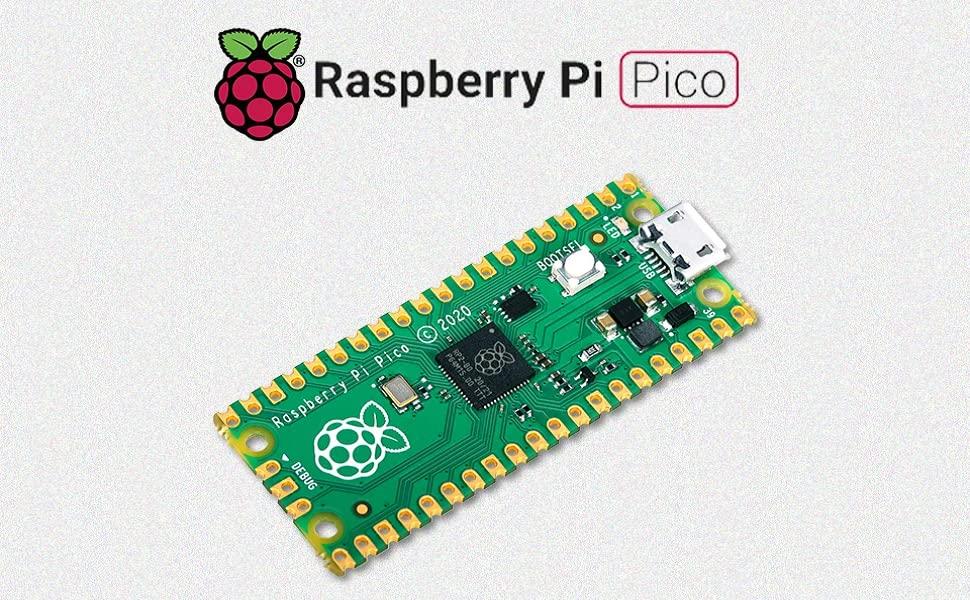
Raspberry Pi Pico

Raspberry Pi Pico is the first product built on silicon designed in-house here at Raspberry Pi (“Raspberry Silicon”). At its heart is RP2040, a Raspberry Pi-designed chip, which features Dual Core ARM Cortex-M0+ clocked at 133MHz; 256KB RAM; 30 GPIO pins; and a broad range of interfacing options. Raspberry Pi Pico is paired with 2MB of onboard QSPI Flash memory for code and data storage.

Whether you choose to use Raspberry Pi’s C/C++ Software Development Kit or the official Micro Python port, everything you need to get started is here. You’ll also find links to the technical documentation for both the Raspberry Pi Pico microcontroller board and our RP2040 microcontroller chip.”

Raspberry Pi Pico RFID ExpansionRaspberry Pi Pico RFID Expansion

Raspberry Pi Pico RFID Expansion is the latest technology in the range of SB Components products boasting an advanced RFID Reader at the frequency of 125KHz with a compact design that has a programmable 0.91” OLED Display and, an updated UART/I2C interface running, that is compatible with Raspberry Pi Pico.

It helps the user to read the information of the ID stored on the RFID key fob and tags. Every RFID tag/key fob comes with a unique identity that cannot get copied. There are control jumpers that allow the user to control the OLED, RFID reader, and buzzer pins, other than the default pins.

Raspberry Pi Pico RFID ExpansionRaspberry Pi Pico RFID Expansion

Raspberry Pi Pico RFID ExpansionRaspberry Pi Pico RFID Expansion Raspberry Pi Pico RFID Expansion

UART/I2C Communication InterfaceSupports 125kHz Key Fob/ TagsProgrammable buzzerI2C/ UART Buzzer selection JumperOnboard Programmable 0.91” OLED DisplayCome with development resources and manual

Features

Raspberry Pi Pico

Raspberry Pi Pico is a low-cost, high-performance microcontroller board with flexible digital interfaces, built on silicon designed at Raspberry PiRP2040 microcontroller chip designed by Raspberry Pi in the United KingdomDual-core ARM Cortex M0+ processor, the flexible clock running up to 133 MHz264kB of SRAM, and 2MB of onboard Flash memoryCastellated module allows soldering directly to carrier boardsUSB 1.1 Host and Device supportLow-power sleep and dormant modes

Raspberry Pi Pico

Microcontroller RP2040 microcontroller with 2MByte Flash Operating Voltage 5V DC via USB connector I/O Pins 26 GPIO (3.3v rated), 23 are digital-only and 3 are ADC capable Digital peripherals 2x UART, 2x I2C, 2x SPI, up to 16 PWM channels Analog 12-bit 500ksps Analogue to Digital Converter (ADC) Flash Memory 2MByte QSPI Flash memory SRAM 264K multi-bank high-performance SRAM Clock Speed Dual-core cortex M0+ at up to 133MHz LED_BUILTIN GP25 Inbuilt temperature Sensor Yes Debug 3-pin ARM Serial Wire Debug (SWD) port Timer and Counter 1x Timer with 4 alarms, 1x Real Time Counter Programmable IO (PIO) 8×Programmable IO (PIO) state machines for custom peripheral support Module Type The castellated module allows soldering directly to carrier boards

Raspberry Pi Pico RFID Expansion

Operating Voltage 5V RFID Tag Frequency 125 kHz Communication Interface UART/I2C Default Baud Rate 9600 bps

Kit Content

raspberry pi picoraspberry pi pico

Raspberry Pi Pico RFID ExpansionRaspberry Pi Pico RFID Expansion

RFID Key FobRFID Key Fob

RFID CardRFID Card

1 x Raspberry Pi Pico

1 x Pico RFID Expansion

1 x RFID Key Fob

1 x RFID Card


Raspberry Pi Pico is Raspberry Pi's first microcontroller board, designed especially for physical computing
It can be easily reprogrammed over USB from a Raspberry Pi or other computer using the C/C++ SDK or the official MicroPython port
Raspberry Pi Pico RFID Expansion helps the users to read the information of ID stored on the keyfob and tags
There are control jumpers that allow the user to control the OLED, RFID reader, and buzzer pins, other than the default pins
Pico RFID Expansion is specifically made to work with the Raspberry Pi Pico Board

0 Comments

Waveshare Servo Driver HAT (B) for Raspberry Pi 16-Channel 12-bit I2C Interface Right Angle Pinheader


Overview

Needless to say, the Raspberry Pi is powerful enough in most cases, yet it's not that good at providing precise PWM output.
You may have tried to control a robotic arm or a hexapod walker by using the Pi, but finally get frustrated due to the limited number of PWM outputs and the jittering servo.
Now you get a new option to bring your ideas to life, we prepare this useful Servo Driver HAT for you.

Features

Standard Raspberry Pi 40PIN GPIO extension header, supports Raspberry Pi series boards, Jetson Nano
I2C controlled, using only 2 pins
Up to 16-Channel servo/PWM outputs, 12-bit resolution for each channel (4096 scales)
Integrates 5V regulator, up to 3A output current, can be powered from battery through VIN terminal
Standard servo interface, supports common used servo.
Reserved I2C control pins, allows to work with other control boards
Comes with development resources and manual (examples in python like Bluetooth/WiFi remote control)

Specifications

Power supply: 5V (Pi connector) OR 6V~12V (VIN terminal)
Servo voltage: 5V
Logic voltage: 3.3V
Driver: PCA9685
Control interface: I2C
Dimension: 65mm x 30mm
Mounting hole size: 3.0mm

Supported Servo

This HAT can be used to drive servos

Wiki : www.waveshare.com/wiki/Servo_Driver_HAT?Amazon

PACKAGE CONTENT

Note: Raspberry Pi and servos are NOT included.
Servo Driver HAT (B) x1
RPi screws pack (2pcs) x1

Note: Raspberry Pi and servos are NOT included.
Standard Raspberry Pi 40PIN GPIO extension header, supports Raspberry Pi series boards, Jetson Nano.
I2C controlled, using only 2 pins.Up to 16-Channel servo/PWM outputs, 12-bit resolution for each channel (4096 scales).
Integrates 5V regulator, up to 3A output current, can be powered from battery through VIN terminal.
Standard servo interface, supports common used servo. Reserved I2C control pins, allows to work with other control boards. This HAT can be used to drive servos.

0 Comments

Waveshare Servo Driver Module for Raspberry Pi Pico Ideal for Controlling Robotic Arm or Hexapod Walker 16-Channel Outputs 16-Bit Resolution

Features At A Glance
Standard Raspberry Pi Pico header, supports Raspberry Pi Pico series boards
Up to 16-Channel servo/PWM outputs, 16-bit resolution for each channel
Integrates 5V regulator, up to 3A output current, allows battery power supply from the VIN terminal
Standard servo interface, supports common used servo.
Exposes unused pins of Pico, easy expansion
Comes with development resources and manual (Raspberry Pi Pico C/C++ and MicroPython examples)
Specifications
OPERATING VOLTAGE 5V (Pico) or 6~12V (VIN terminal)
SERVO VOLTAGE LEVEL 5V
LOGIC LEVEL 3.3V
CONTROL INTERFACE GPIO
MOUNTING HOLE SIZE 3.0mm
DIMENSIONS 65 × 56mm

Standard Raspberry Pi Pico header, supports Raspberry Pi Pico series boards
Up to 16-Channel servo/PWM outputs, 16-bit resolution for each channel
Integrates 5V regulator, up to 3A output current, allows battery power supply from the VIN terminal
Standard servo interface, supports common used servo.
Exposes unused pins of Pico, easy expansion
Comes with development resources and manual (Raspberry Pi Pico C/C++ and MicroPython examples)

0 Comments

FREENOVE Super Starter Kit for ESP8266 (Included) (Compatible with Arduino IDE), ESP-12S Onboard Wi-Fi, MicroPython C Code, 496-Page Detailed Tutorial, 173 Items, 77 Projects

Overview:

ESP8266 (ESP-12S) is a powerful and small controller with onboard Wi-Fi.
This kit helps you learn and use it with its tutorial and project examples.

We provide free technical support to help you with any questions and problems.

Tutorial and Code:

Comes with detailed tutorial and MicroPython, C code. (Download needed, no paper tutorial.)
Including basic electronics knowledge and dozens of projects.

The download link can be found on the product box.

Contents of MicroPython / C Tutorial:

Preface
  ESP8266
  Programming Software
  Environment Configuration
Chapter 1 LED
  Project 1.1 Blink
Chapter 2 Button & LED
  Project 2.1 Button & LED
  Project 2.2 Mini Table Lamp
  ...
(Download tutorial for details)
  ...
Chapter 21 TCP/IP
  Project 21.1 As Client
  Project 21.2 As Server
Chapter 22 Smart Home
  Project 22.1 Control LED through Web
What's Next?

2 programming languages -> MicroPython and C.
496-page detailed tutorial (including basic electronics knowledge) -> The download link can be found on the product box. (No paper tutorial.)
173 items for 77 projects -> Each project has circuit diagrams and verified code with detailed explanations.
ESP8266 (ESP-12S) -> A powerful and small controller with onboard Wi-Fi. (Included in this kit.)
Get support -> Our technical support team is always ready to answer your questions.

0 Comments

sb components Raspberry Pi Pico Board with Pico RTC HAT Raspberry Pi Real-Time Clock Expansion Module for Raspberry Pi Pico, Raspberry Pi Pico Kit

sb componentssb components Raspberry pi pico boardRaspberry pi pico board

Raspberry Pi Pico

Raspberry Pi Pico is the first product built on silicon designed in-house here at Raspberry Pi (“Raspberry Silicon”). At its heart is RP2040, a Raspberry Pi-designed chip, which features Dual Core ARM Cortex-M0+ clocked at 133MHz; 256KB RAM; 30 GPIO pins; and a broad range of interfacing options. Raspberry Pi Pico is paired with 2MB of onboard QSPI Flash memory for code and data storage.

Whether you choose to use Raspberry Pi’s C/C++ Software Development Kit or the official Micro Python port, everything you need to get started is here. You’ll also find links to the technical documentation for both the Raspberry Pi Pico microcontroller board and our RP2040 microcontroller chip.”

raspberry pi pico, Pico RTC HATraspberry pi pico, Pico RTC HAT

Pico RTC HAT

Pico RTC HAT is a Real-Time clock expansion module with the powerful IC DS3231, backup battery holder, operating voltage 3.3 V, and Fast (400kHz) I2C Interface that measures the time which aligns the time of the device with the “Real-Time”. It is developed with the standard Raspberry Pi Pico header that supports the Raspberry Pi Pico series to enhance its efficiency at a low cost.

Pico Board with Pico RTC HATPico Board with Pico RTC HAT

Applications

raspberry pi pico, raspberry pi pico rtc hatraspberry pi pico, raspberry pi pico rtc hat

Features

Accuracy ±2ppm from 0°C to +40°CAccuracy ±3.5ppm from -40°C to +85°CBattery Backup Input for Continuous TimekeepingOperating Temperature Ranges Commercial: 0°C to +70°C Industrial: -40°C to +85°CLow-Power ConsumptionTwo Time-of-Day AlarmsProgrammable Square-Wave OutputDigital Temp Sensor Output: ±3°C AccuracyReal-Time Clock Counts Seconds, Minutes, Hours, Day, Date, Month, and Year with Leap Year Compensation Valid Up to 2100 Specifications Operating Voltage: 3.3V Inbuilt IC: DS3231 Battery: CR1220 coin cell I2C Interface: 400KHz Backup Battery Voltage: 2.3V-5.5V Pico Board with Pico RTC HATPico Board with Pico RTC HAT

Kit Content

1 x Raspberry Pi Pico1 x Pico RTC HAT

Note: Other items are only for reference!


Raspberry Pi Pico is Raspberry Pi's first microcontroller board, designed especially for physical computing
It can be easily reprogrammed over USB from a Raspberry Pi or other computer using the C/C++ SDK or the official MicroPython port
Pico RTC HAT is a Real-Time clock expansion module with the powerful IC DS3231.
Stackable design with fast I2C interface.
Pico RTC hat is specifically made to work with the Raspberry Pi Pico Board

0 Comments

D-Link DWA-F18 VR Air Bridge, Dedicated Wireless Connection from Gaming PC to Meta Quest 2 or Quest 3 or Meta Quest Pro, VR for 360° Movement, Supports Oculus App

VR Air Bridge DWA-F18VR Air Bridge DWA-F18

VR Air Bridge DWA-F18

Dedicated wireless link from your gaming PC1 to your Meta Quest 2/Meta Quest Pro/Meta Quest 3 VR headset, Full 360° freedom of movement in VR, without the Quest Link cable, Fast, dedicated Wi-Fi 6 (802.11ax), with OFDMA and MU-MIMO efficiency, Ultra low-latency features for smoother VR experiences, Expanded VR games & apps from Meta Rift library, USB 3.2 Gen 1 & includes USB cradle

VR Air Bridge DWA-F18VR Air Bridge DWA-F18

VR Air Bridge DWA-F18

Dedicated wireless link from your gaming PC1 to your Meta Quest 2/Meta Quest Pro/Meta Quest 3 VR headset, Full 360° freedom of movement in VR, without the Quest Link cable, Fast, dedicated Wi-Fi 6 (802.11ax), with OFDMA and MU-MIMO efficiency, Ultra low-latency features for smoother VR experiences, Expanded VR games & apps from Meta Rift library, USB 3.2 Gen 1 & includes USB cradle

VR Air Bridge DWA-F18VR Air Bridge DWA-F18

VR Air Bridge DWA-F18

Dedicated wireless link from your gaming PC1 to your Meta Quest 2/Meta Quest Pro/Meta Quest 3 VR headset, Full 360° freedom of movement in VR, without the Quest Link cable, Fast, dedicated Wi-Fi 6 (802.11ax), with OFDMA and MU-MIMO efficiency, Ultra low-latency features for smoother VR experiences, Expanded VR games & apps from Meta Rift library, USB 3.2 Gen 1 & includes USB cradle

VR Air Bridge DWA-F18VR Air Bridge DWA-F18

VR Air Bridge DWA-F18

Dedicated wireless link from your gaming PC1 to your Meta Quest 2/Meta Quest Pro/Meta Quest 3 VR headset, Full 360° freedom of movement in VR, without the Quest Link cable, Fast, dedicated Wi-Fi 6 (802.11ax), with OFDMA and MU-MIMO efficiency, Ultra low-latency features for smoother VR experiences, Expanded VR games & apps from Meta Rift library, USB 3.2 Gen 1 & includes USB cradle

VR Air Bridge DWA-F18VR Air Bridge DWA-F18

VR Air Bridge DWA-F18VR Air Bridge DWA-F18

VR Air Bridge DWA-F18VR Air Bridge DWA-F18

VR Air Bridge DWA-F18VR Air Bridge DWA-F18

Enjoy vivid VR, with 360° freedom to move.Enjoy vivid VR, with 360° freedom to move.

Enjoy vivid VR, with 360° freedom to move.

Experience wire-free Meta Quest VR gaming with this official Made for Meta accessory - the D-Link VR Air Bridge (DWA-F18). Create a dedicated

Wi-Fi 6 wireless link from your gaming computer1 to your Meta Quest headset. Now you can enjoy lag-free VR games using the latest generation of wireless, without the Quest Link cable.

The VR Air Bridge AdvantageThe VR Air Bridge Advantage

The VR Air Bridge Advantage

The VR Air Bridge was designed to create a low latency dedicated wireless connection between your gaming PC and Meta Quest 2, Meta Quest 3 or Meta Quest Pro headset, leveraging advanced features to get the most out of your VR experience.

A lightning-fast Wi-Fi 6 link, just for your VR.A lightning-fast Wi-Fi 6 link, just for your VR.

PC VR Gaming via your Home Wi-Fi RouterPC VR Gaming via your Home Wi-Fi Router

Roam free in high-quality VR.Roam free in high-quality VR.

A lightning-fast Wi-Fi 6 link, just for your VR.

The Air Bridge creates an exclusive link to your headset using the latest generation Wi-Fi 6 technology so you can take advantage of faster wireless speeds just for your VR. Take your gaming to the next level without any interruptions.

PC VR Gaming via your Home Wi-Fi Router

Connecting the Meta Quest 2, Meta Quest 3, or Meta Quest Pro headset to a PC via an existing Wi-Fi network may be hit or miss depending on the Wi-Fi environment, router location, and the number of devices connected to the router.

Roam free in high-quality VR.

Reach further distances, feel more space around you, and see breath-taking detail in VR while playing your favourite VR games – all by using one seriously fast, dedicated wireless link to your Meta Quest headset. No more tangled cords or restricted movements.

Fix Meta Quest VR lag. Never get tied down again.Fix Meta Quest VR lag. Never get tied down again.

Enjoy VR and freedom to moveEnjoy VR and freedom to move Enjoy VR and freedom to move

The Air Bridge creates a direct and dedicated wireless link to your Meta Quest headset so you can enjoy wire-free VR that’s faster, smoother, and even more immersive

Fix Meta Quest VR lag. Never get tied down again.

Experiencing VR lag?

Using a home router with a congested wireless network for VR can overload your network and result in poor connection speeds that interrupt or even disconnect your VR

Quest Link Cable tying you down?

The cable can keep you from reaching further into your physical space and detracts from the VR experience


Highly immersive PC virtual reality gaming experience: the DWA-F18 is specially designed for Meta Quest 3 or Quest 2 and Pro to ensure easy installation and optimal performance with your Meta Quest 2 or Quest 3 headset
Connect your Meta Quest 3 or Quest 2 or Pro headset wirelessly to your PC via WiFi 6 using this USB 3.2 adapter, without Quest Link cable
Get access to the wide range of PC VR games and apps from the Meta Rift library
Enjoy the ultimate freedom of movement and smooth frame rates for an unparalleled gaming experience, collaboration, workouts and more
Official accessory for Meta Quest 3 or Quest 2 and Pro that allows full freedom of movement in VR and is optimized for performance

0 Comments

End of content

No more pages to load