

BenQ ZOWIE XL2540K Esports Gaming Monitor | 24.5 inch 240Hz XL Setting to Share | 120Hz Compatible for PS5 and Xbox Series X

xl2540kxl2540k

xl2540kxl2540k

xl2540kxl2540k

xl2540kxl2540k

Fluid & flexible adjustment – More comfort in-game

We understand that each player has their own unique combination of monitor height and angle adjustment. With height adjustment & free tilt, players are able to setup quickly and conveniently resulting in a more comfortable playing environment.

Smaller Base – More Playing Space

New base is designed to take up less space while maintaining the same stability. This allows gamers more space in their setup for in-game movements and allows them the flexibility to make adjustments and play comfortably.

XL Setting to Share

Share your own settings with a teammate, friend or your fans. Save video profiles quickly and share conveniently through a simple user interface.

xl2540kxl2540k

xl2540kxl2540k

xl2540kxl2540k

Customizable Quick Access

The change to the user interface is more than just cosmetic. The redesigned interface provides you the ability to customize which FPS settings you would like to access quickly via a quick menu and then allows you to access them with one-touch. Setting up before games or during rounds is now much more convenient.

Make visual adjustments based on your in-game needs

Black eQualizer to increase visibility in dark scenes without overexposing the bright areas, Color Vibrance to adjust color setting and tone to differentiate enemy targets in-game, and Game modes to switch between presets for different game titles.

No compromise in durability for aesthetics

During the design process, durability was not sacrificed for aesthetics. The LCD panel is better protected through a frame design that provides added resistance on the sides. This is especially useful when transporting the monitors to LAN events or BYOC’s.

LCD Size / refresh rate 24.5“ / 240Hz (TN Panel) 24.5“ / 240Hz (TN Panel) 24.5“ / 240Hz (TN Panel) 24.5“ / 240Hz (TN Panel) Resolution (Max.) 1920 x 1080 1920 x 1080 1920 x 1080 1920 x 1080 Input / Output Connector HDMI2.0x3,DP1.2, Headphone Jack DVI-DL, HDMIx2, DP1.2, Headphone Jack, Mic Jack HDMI2.0x3, DP1.2, Headphone Jack DVI-DL, HDMIx2, DP1.2, Headphone Jack, Mic Jack DyAc Technology Yes (DyAc+) Yes Fast liquid crystal Yes Yes Quick Menu Yes (New interface, customizable)) Yes Yes XL Setting to Share Yes Yes S-Switch Yes (optional) Yes Yes Yes Shield Yes (optional) Yes Yes Yes
New, space-saving base design gives players greater freedom of movement
Extended height adjustment and free tilt adjustment offer more flexibility according to personal preferences
Easy sharing of settings via XL Setting to Share
Quick menu with customizable access
Accessories available separately: The redesigned S-Switch allows 4-way scrolling, the innovative shield can be installed without screws
Color Vibrance and Black eQualizer increase the sharpness of the image and allow individual color adjustment

0 Comments

Portable Monitor, ZFTVNIE 14 Inch Small HDMI Monitor IPS Full HD 1920×1080 Mini LED Monitor for Computer PS4 Xbox Raspberry Pi, 60Hz, Wall Mountable, Built-in Speakers, Plug&Play

14 inch portable monitor14 inch portable monitor

I. Full HD 1920x1080 pixel monitor

The ultra-clear monitor gives you more image space for one big picture and high clarity.

II. IPS Panel

The IPS (In-Plane Switching) panel is undefeatable when it comes to consistently delivering top color performance & sharp visibility from multiple viewing angles.

III. VESA Wall mountable

The 75mm VESA pattern gives you plenty of options for mounting your monitor on whatever wall or desk suits your fancy.

IV. Portable Size

With a portable design(Only weighs 0.69kg), you can take it anywhere. It will be an ideal choice for your business trip.

V. Blue Light Shift

Blue Light Shift reduces blue light, allowing you to comfortably work, watch, or play applications without straining your eyes.

VI. 3ms Response Time

Rapid 3 milliseconds response time reduces deviations in transition time to deliver high-quality moving images, bringing immersive graphics to your movies and games. Your best partner for workYour best partner for work

Working Partner

Easily share your screen with others to create a multi-display environment.

Lower Blue LightLower Blue Light

Immersive GamingImmersive Gaming

Built-in SpeakersBuilt-in Speakers

Low Blue Light

Flicker-free and low blue light technology reduces the flicker and blue light that occurs in conventional LCDs, reduces eye fatigue caused by working for a long time and protects your eyes.

Gaming Choice

Take the screen with you, and start your game journey at any time.

Dual speakers

Two built-in dual speakers in the USB monitor deliver booming sound with crystal clear audio quality, bringing a small home theater experience to your home.

VESA CompatibleVESA Compatible

VESA Compatible

Supports 75 x 75mm VESA for more mounting options (wall/desktop).

Monitor Specification

Screen Size 14 inch Panel Type IPS(In Panel Switching) Screen Brightness 300 cd/㎡ Resolution 1920 x 1080 pixels Refresh Rate 60Hz Contrast 1000:1 Response Time 3 milliseconds Backlight LED Screen Ratio 16:9 Wide Screen Yes Body Material Aluminum Alloy Metal Speakers Two 1.5W built-in cavity speakers Multi-interface HDMI input 1 / HDMI input 2 / Headphone jack / DC input (12V) / 5V 2A-3A Micro USB input Connectable Devices Computer/Laptop/PS4/Switch/XBOX/TV Box, etc. Colour Black DC input port specification DC 12 2A input, 3.5*1.35mm FAQs

Q: What comes in the package?

A: Package: 1 x 14-inch Portable Display, 1 x Mounting Stand, 1 x HDMI Cable, 1 x User Manual

Q: Can it be powered by a power bank?

A: Yes, this portable monitor can be powered by a power bank or laptop. Please use a 5V 2A-3A output portable power source to power this monitor via connecting the Micro USB power input port.

Q: What if the user manual is lost?

A: If the paper manual is lost, we can offer an electronic manual (PDF file).

Q: Can I use USB chargers to power this monitor?

A: Yes, this monitor has a Micro USB port, you can power this monitor by connecting the USB port to a power source.


[Ultra-portable] An ultra-thin portable monitor that is about 325mm long, 175mm wide and weighs about 685g, so you can take it anywhere. Comes with a metal stand with VESA standard 75x75mm mounting holes on the back for wall mounting for multi-monitor environments. Ideal for meeting presentations, presentation of materials, etc.
[Widely Used] 2 standard HDMI input ports, a DC 12V input port, a Micro USB 5V 2A input port, and a 3.5mm headphone jack, plug and play. Compatible with Laptops, Desktops, Smartphones, PS3/PS4, XBOX ONE, and more, this portable monitor can be easily connected to game consoles and other entertainment or office peripherals.
[Dual Speakers & Eye Protection] With built-in dual speakers, this external monitor offers an immersive audio feast while watching games or movies. 300cd/㎡ brightness, low blue light design helps reduce eye strain.
[Guarantee] ZFTVNIE guarantees an unconditional refund if there is any quality problem with your monitor within 30 days. If you encounter any problems when using the product, please contact our customer service team, we will be at your service. Please kindly note that this monitor can be powered by USB chargers(5V 2A - 3A). If you have received an unsuitable power adapter, please use your phone's Micro USB charger to power the monitor, or please contact us.

0 Comments

KUMK Portable Monitor Touchscreen, 15-inch 1920×1080 Full HD IPS 10-Point Capacitive Touchscreen, with Type-C & HDMI Portable Laptop Monitor, Dual Speakers for PC/Laptop/Phone/PS3/PS4/PS5/Xbox/Switch

portable monitorportable monitor

KUMK Portable Monitor Touchscreen - Ultra Slim & User-friendly Design

Equipped with 15-inch full HD IPS panel and 10-point capacitive touch. Portable design for laptop, computer, smartphone, gaming, and eg. Built-in dual speaker, leather case bracket, USB C, HDMI, speaker, eye care.

How to Connect Your Device?

To connect smartphones or laptops via USB-C to USB-C cable to realize data & touch & power supply, please confirm your device has USB-C 3.1 gen2 or USB-C Thunderbolt 3.0 port that supports both video and audio transmission. However, if your device cannot output enough power. Please supply power to the monitor.To connect laptop or PC via Mini HDMI to HDMI cable to realize data transmission, and use a USB to USB-C cable to connect the monitor and your device to realize touch function. Please use included USB to USB-C cable and power adapter to power the monitor at the same time.To connect other HDMI devices (For example PS3/4/5, Switch, Xbox, TV, Drone, Microscope, Camera, Raspberry Pi, etc.) via Mini HDMI to HDMI cable as an external screen. Please use included USB to USB-C cable and power adapter to power the monitor at the same time.

Question: The message "No signal then save power" is displayed on the screen. What should I do?

Answer: This is just the monitor. If you only supply power to the monitor without connecting to a compatible device, the message "No signal then save power" will be displayed. Please make sure to use a compatible device to connect to the monitor.

portable monitorportable monitor

Package Contents:

15-inch Portable Touchscreen x1Type-C to Type-C Cable (For data & touch & power supply) x1HDMI to Mini HDMI Cable (For data transmission) x1USB-A to Type-C Cable (One cable is for the power supply. The other cable is used to realize touch functions.) x2Power Adapter x1Magnetic Cover x1User Manual x1

portable monitorportable monitor

portable monitorportable monitor

portable monitorportable monitor

Expand Your Phone Screen

Only one USB-C cable is connected to smartphones and this monitor to achieve Data & Touch & Power Supply. If your phone cannot provide enough power, please also provide an external power source for the monitor.You can choose a desktop mode or phone mode. Its versatility can help you complete your work more efficiently or greatly enhance your entertainment experience.Note: The smartphone should have a USB-C 3.1 gen2 port that supports the PD protocol (which can transmit audio and video). USB-C Play & Play

For devices with USB-C Thunderbolt 3.0, only one USB-C to USB-C is needed to realize signal transmission, touch, and power supply. But if your device cannot output enough power, please provide additional power for the monitor. Quickly connect and expand the monitor through plug-and-play technology to increase productivity. How do HDMI laptops, PC and Raspberry Pi realize touch?

First, please use either of the included USB to USB-C cables, and a power adapter to power the monitor.Secondly, connect a laptop or PC with a Mini HDMI to HDMI cable for data transmission.Finally, please use either of the included USB to USB-C cables to connect the monitor and the device to achieve touch function.It supports 3-in-1 mode, which is very suitable as an external monitor for laptops or computers.

portable monitorportable monitor

portable monitorportable monitor

portable monitorportable monitor

Watch It Your Way

There are two VESA bracket holes on the back of the monitor. You can fix the monitor on the stand so that you can work better and watch videos or play games.When connected to a laptop or computer, this portable monitor can work in landscape and portrait modes by setting it up on your device, providing you with a perfect viewing experience when browsing, editing or watching. Portable Gaming Monitor

This portable LCD monitor uses an advanced IPS panel with low blue light eye care technology that minimizes blue light to reduce eye strain. Connect your XBOX, PS5/4/3, Switch, Wii, and other game consoles to this portable monitor, and enjoy a larger screen and a more passionate gaming experience anytime, anywhere. Dual Stereo Speakers

The portable monitor has built-in dual speakers to provide you with super high-quality stereo output and an immersive surround sound experience for your viewing, listening, and gaming.In addition, the 3.5mm audio jack allows you to connect your own headphones or speakers. Meet your different audio needs to adapt to different scenarios. portable monitorportable monitor
[FHD 1080P IPS Screen] The 15-inch touchscreen has an amazing 1920*1080 high resolution. The anti-glare IPS panel provides a wide viewing angle of 178° and low blue light helps to protect the eyes. It has 100% sRGB, 16.7Million colors, 300cd/㎡ brightness, and 1400:1 contrast ratio. The monitor can provide high-quality images and an excellent experience.
[Plug and Play] No driver is required. Only a Type-C to Type-C cable is needed to connect to a full-featured Type-C device to realize power supply/data/touch functions. For an HDMI device, it needs to be connected to an external power source, and a USB to USB-C cable needs to be used to connect to the device to realize the touch function. The simple method of the connection brings you greater convenience.
[General Compatibility] KUMK portable monitor is compatible with various devices, such as computers, laptops, mini computers, tablets, smartphones, TVs, PS3/4/5, Switch, Xbox, drones, microscopes, cameras, raspberries Pie, and so on. The fast connection and stable data transmission it provides are truly friendly designs.
[Portable, Lightweight & Durable] With a 0.39-inch ultra-thin profile and a weight of just 1.5 pounds. Made of magnesium alloy material, equipped with a removable bracket holster. It is not only light, thin, portable but also sturdy and durable. Easy to go out and carry without worry. In addition, there are two VESA holes on the back of the monitor, allowing users to mount the monitor on a VESA stand. It is a friendly partner for offices, games, and entertainment.

0 Comments

Pisichen 17.3 inch Portable Monitor, Full HD 1600×900 Display with USB HDMI Input, PC Monitor for Laptop,PC,PS4, PS3, Xbox Ones,Raspberry Pi

Pisichen 17.3 inch Portable Monitor:
Detailed Specification:
Screen size: 17.3"
Shell material: aluminum alloy metal
Resolution: 1600*900
Response time: 2ms
Speakers: Built-in two 1.5W cavity speakers.
Multi-interfaces: HDMI input 1/ HDMI input 2/ headphone jack/DC input(12V)/5V USB
DC power supply: yes

How to use this portable monitor?
1. A 5V/2A cable or DC12V is required to provide power to the display;
2. Connect your device to the monitor with an HDMI cable; (If your device is low on power, the monitor will not boot and you will need to power the monitor separately)
3. If you want to install it on a VESA, the screw size is M4 ( 75x75MM).
It Can Use For Following Area:
1. Sub Screen for laptop and smartphone,The Monitor Can Used as second screen for Laptop,smartphone,mobile phone,iphone.
2. Work As Portable Game Monitor,It Compatible With XBOX ONE S,XBOX ONE,PS4,PS3,Xbox 360.
3. Streaming Media Play/TV Box Monitor: It Support Most Hdmi Input Device,It Give A Full HD Visual Enjoyment.
Q&A:
1.Question: Is this the actual picture of the product?
Answer: Yes, This is the actual pictures of Pisichen portable display, please feel free to buy it!
2.Question: Does this work on a Mac?
Answer: Yes, it works on Mac.
3.Question: I will mount this on a wall so I won't have access to the back of the unit, this powers on automatically when you connect power to it?
Answer: Yes, the monitor will power on automatically when you connect power to it.
4.Question: Will this work with my Linux machine?
Answer: As long as your device has an HDMI interface, the portable display will be able to connect to the Linux machine.

Package includes:
Portable 17.3 inch monitor x 1.
HDMI cable x 1.
Power cable x 1.
Metal support x 1.

【Small and Portable】-- Second monitor for your laptop or PC, improving your work efficiency. Slim design is convenient for business, travel and gaming. Supports only windows 7/8/10 OS; Mac OS and any other system.
【Gaming Monitor】-- This portable monitor is equiped with a HDMI input, working perfectly with Xbox One, PS3, PS4, Switch, Raspberry Pi, etc. Besides, this monitor can connect with DSLR camera.
【Multi-interfaces】-- HDMI Port , Dual 1.5w speaker, One 3.5 mm headphone jack, One DC12V input interface and 5V USB input used for power the monitor.
[Trusted Customer Service] -- 100% money back guarantee for any problem in 30 days, one year warranty to ensure your satisfaction. If you have any questions, please contact shshlgwlkj@sohu.com. We will always serve for you.

0 Comments

Samsung LC27R500FHPXXU 27″ Curved FullHD 1080p Monitor – 1920×1080, HDMI, VGA

Captivating CurvesCaptivating Curves

Supersleek ScreenSupersleek Screen

All Action, No DelayAll Action, No Delay

Captivating Curves

Immerse yourself in work or play.

The 1800R curved screen wraps around you, pulls you in, and keeps you focused.

The curvature reduces eye strain, so computing is more comfortable than ever before.

Supersleek Screen

Designed with style in mind.

The 3 sided bezel-less display stretches from edge to edge for maximum viewing and a minimalist aesthetic.

A refined dark blue gray exterior and Y shaped stand base bring a sleek, modern look to your desk.

All Action, No Delay

Superfluid entertainment experience.

AMD Radeon FreeSync keeps your monitor and graphics card refresh rate in sync to reduced image tear and stutter.

Even fast action scenes look seamless and smooth.

More Gaming PowerMore Gaming Power

See True DetailSee True Detail

Focused ComfortFocused Comfort

More Gaming Power

Ideal game settings instantly give you the edge.

Get optimal colour settings and image contrast to see scenes more vividly and spot enemies hiding in the dark.

Game Mode adjusts any game to fill your screen with every detail in view.

See True Detail

Every scene, incredibly defined.

Samsung's innovative VA Panel technology delivers an outstanding 3000:1 contrast ratio with deeper blacks and more brilliant whites.

Minimal light leaks from corner to corner so even very dark or bright images are crystal clear on your screen.

Focused Comfort

Protect your eyes and do more.

The advanced eye comfort technology reduces eye strain for more comfortable extended computing.

Flicker Free technology continuously removes tiring and irritating screen flicker, while Eye Saver Mode minimises emitted blue light.


The 3 sided bezel-less display stretches from edge to edge for maximum viewing and a minimalist aesthetic. A refined dark blue gray exterior and Y_shaped stand base bring a sleek, modern look to your desk.
AMD FreeSync keeps your monitor and graphics card refresh rate in sync to reduced image tear and stutter. Even fast action scenes look seamless and smooth.
Samsung's innovative VA Panel technology delivers an outstanding 3000:1 contrast ratio with deeper blacks and more brilliant whites.
Flicker Free technology continuously removes tiring and irritating screen flicker, while Eye Saver Mode minimizes emitted blue light. Your eyes stay fresh longer.

0 Comments

HP EliteDisplay E243m LED-Monitor LEDMonitor 60 5 HP5 5 cm (23 8″) HP8 8″ (1FH48AT#ABB)

HP Elitedisplay E243HP Elitedisplay E243 E243 SeriesE243 Series

HP EliteDisplay E243 Series delivers optimal vision, productivity and ergonomics.

The HP EliteDisplay E243 is the series of devices that lets you connect and collaborate with colleagues in high efficiency.

IPS monitors with high-resolution LED backlighting and a wide 178-degree viewing angle.

With Micro Edge bezel on three sides for multi-display tiling and four ergonomic adjustment modes (models only)
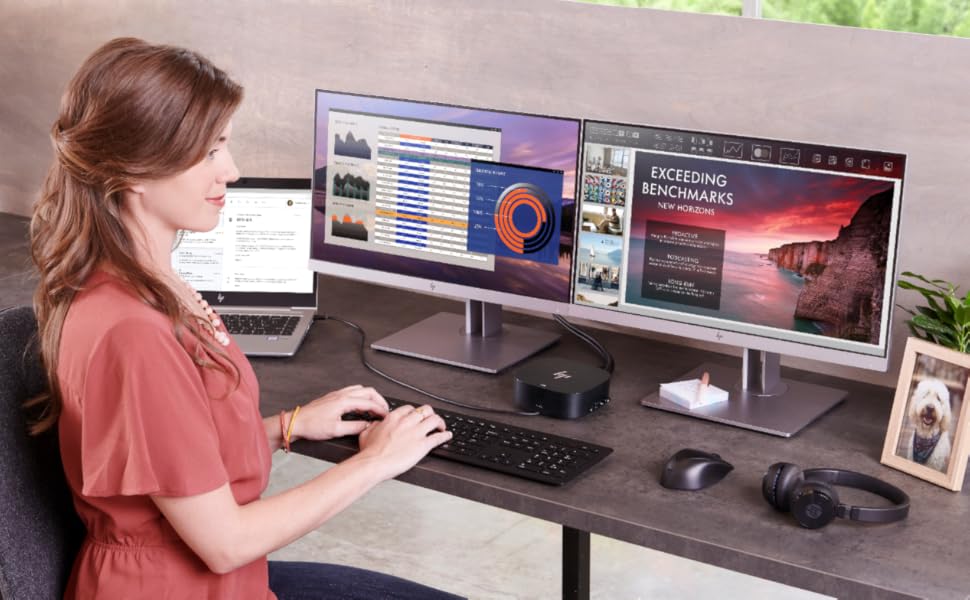
HP EliteDisplay E243 Series Features

Skype for BusinessSkype for Business

Micro-EdgeMicro-Edge

Docking StationDocking Station

Skype for Business (E243m only)

Meet colleagues online, between offices, or across continents, with a monitor with an HP Skype for Business Certified Webcam, audio optimized by Bang & Olufsen, microphone and collaboration buttons that let you control calls without an on-screen menu.

Privacy Filter (Only E243p)

Instantly increase privacy in open workspaces and avoid visual hacking with integrated HP Sure View Gen3. No accessories, add-ons or worries.

With Docking Station (E243d only)

The HP EliteDisplay E243d lets you maximize space on your desk.

Create a command center based on a display with an integrated docking station ready to make your workspace work instantly.

Webcams Pop-UpWebcams Pop-Up

AdjustmentAdjustment

Anti-glare panelAnti-glare panel

Webcam Pop-Up (Only E243d and E243m)

The E243d and E243m displays are equipped with Webcam Pop-Up: you can make it appear when you need it, and you can close it when you don't need it, and the microphone is integrated.

Adjustment

To work during the day in comfort you can adjust the tilt from -5 to +23°. In addition, 90° pivot rotation allows you to customize the view with the choice of horizontal or vertical.

Anti-glare panel

The anti-glare monitor lets you enjoy your favourite content, even when exposed to sunlight.

The low-gloss non-reflective surface reduces the reflection of sunlight on the display when you are in an outdoor environment.

0 Comments

End of content

No more pages to load