




Price: £82.99
Last Updated: May 08, 2023 21:23:39 UTC
Product Description


Music S1:Bass Heavier,
Music S2: Vocal Clearer And Bass Will Be Decreased
S-bass:More Bass Effect,
Music,Movie,S-bass:The volume is ≤ 90% (Level 28), the Bass of The Three EQ Are Obviously Different.
News:News, Talk Show And Other Vocal Based Programs
Bass+ /-:Adjust The Bass Effect.
Lower:One key Lowers To 50% Volume To Not Disturb Others.


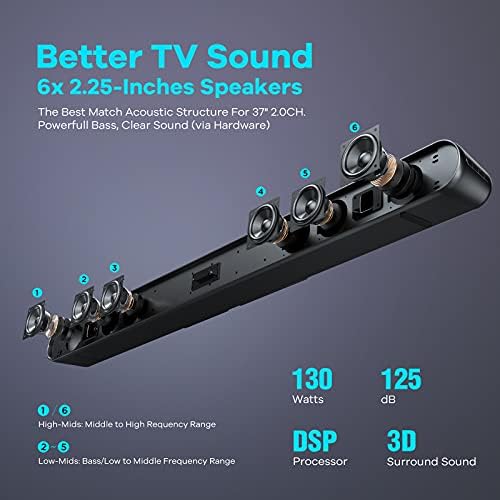
3D Surround and DSP Technology
Feel the charm and passion of sports as if you are on the spot.
The Soundbar Settings (Volume, Sound Mode, Input Source)Can Be Memorized After The Soundbar Is Turned Off.
Auto Off After 10 Seconds Without Press For Remote Control,Any Key Of Remote Control Can Wake Up Its Display.


Close LED Light By Short Press “LED OFF”, Press The Key To Switch ON/OFF For LED Light.
Connect Soundbar To Other Devices Such As Projector Or Laptop Without Bluetooth Via Aux 3.5mm Cable.
Sprayed With Matte Black ,More Classy, Without Obvious Plastic Feeling, Not Easy To Be Dirty.
Specfication:
Bluetooth Version:5.0
Output Power: Peak Power:130W, RMS Power:65W;
AC Input: 100-240V AC , 50 or 60Hz;
Speaker: 2.25″*6
Frequency Range:20Hz-20KHz;
Bluetooth Distance:≤10 meters (30 feets) at the empty space
Distorition:≤1%(RMS 50W),≤10%(RMS 65W)
TV Size & Speaker Power: TV Size≤65″, TV Speaker Power≤50W
Size: L*W*H, 933*91*69mm, 36.75 *3.59 *2.72 Inches
Product Weight:2.8Kg or 6.16 Lb
Setting Guide for TV, TV Box And Soundbar
1)For SPDIF (optical / ARC/Coaxial)/ Aux connections, change the TV’s audio format output to PCM. Only for ARC connections, plus change the setting of TV “HDMI Audio format output” to “PCM”. How find the settings, ask the “Quick Start Guide” PDF file for the detail.
2)Select the correct input source for the soundbar, and set the correct output audio for TV.
3)Open the relative settings of HDMI ARC from TV, such as:
* Sumsung TV: Setting->General->External Device Manager->Anynet+ (HDMI-CEC);
* Sony TV: Setting->Display & Sound->Audio Output->Select “PCM” or “Auto 2”.
4)If you watch TV via TV box such as Roku, Firestick, Apple TV, etc, you need to following settings:
* Roku: Home->Settings->Audio-> HDMI to PCM-Stereo ( Via HDMI ARC output) , or HDMI and SPDIF to PCM-Stereo (Via Optical Output)Choose Stereo for Audio -> Audio Mode
* Fire stick: Settings -> Sound and Display -> Audio, select “Stereo”.
* Apple TV: Settings -> Audio & Video -> Audio Out, select “Stereo”.
* Other TV Box: Find the option such as “Audio”, select “Stereo” item.
Is discontinued by manufacturer : No
Product Dimensions : 9.1 x 91.3 x 6.9 cm; 2.79 Kilograms
Date First Available : 20 Sept. 2020
Manufacturer : Heymell Tech
ASIN : B08JKCSZ4V
Item model number : Voyage 201
Guaranteed software updates until : unknown
HDMI-ARC:with ARC mode, adjust the volume and turn on/off of soundbar via TV remote control. The settings of soundbar can be memorized after it is turned off,no need to set again. A key of remote control to a function,don’t press the wrong.
Multiple connection options: Music playing on bluetooth 5.0 soundbar from Bluetooth enabled devices such as cell phones, tablets or laptops. Sound from soundbar via wired connection with HDMI ARC, Optical, Coaxial and Aux, works with TV, PC, laptop, DVD player, MP3-MP4 player, game consoles, etc.
9 Sound Modes: Music(“S1”:bass heavier, “S2”:vocal clearer), Movie & S-bass (for movie program), News (Programs require clearer vocals, such as talk shows) , game (to be gaming soundbar),Bass+ /-. Various sound mode get different lisgening experience and TV sound experience.You can switch modes with the remote control.
Size and Service: Sprayed matte black, not easy to get dirty. (LxHxD) – 36.75 x 3.59 x 2.72 inches (93.3 x 9.1 x 6.9 cm), 6.2 pounds (2.8 kg). We offer timely technical support and feedback within 24 hours, including a 24 month warranty.


![Prtukyt Wireless Headphones Over Ear, [52 Hrs Playtime] Bluetooth Headphones, 6EQ Modes, Foldable Bluetooth Headset Built-in Mic, Soft Memory Earmuffs (Grey)](https://m.media-amazon.com/images/I/418ZUq6PcpL._AC_.jpg "Prtukyt Wireless Headphones Over Ear, [52 Hrs Playtime] Bluetooth Headphones, 6EQ Modes, Foldable Bluetooth Headset Built-in Mic, Soft Memory Earmuffs (Grey)")

